Calibration
Follow this guide to calibrate your 3MS.
Original Documentation
This guide is a simplified version of the official Happy Hare documentation. I highly recommend you read it as it contains useful information and goes more in detail if you are having trouble with the calibrations.
Verify Filament Sensors
Before calibrating, it is important to ensure that your filament sensors are working properly.
Run in your Klipper console:
and verify the output. For each endstop, open means no filament detected, and TRIGGERED means filament present. Re-run the command several times, inserting/removing filament to each of the sensors, to verify that each filament sensor properly detects filament.
Gear Steppers
First, calibrate your gear steppers (filament units). The goal of this calibration is to ensure the filament actually moves as far as expected.
First, detach the PTFE tubing from each of the filament units.
For each filament unit (gate), repeat the following steps:
- Manually load filament until it sticks out slightly from the end of the filament unit
- Cut the tip of the filament to be flush with the PTFE coupler (side cutters are good for this).
-
Run the following commands in your Klipper console:
where
nis the gate number you are calibrating (starting at zero). -
The filament should move forwards. If it moves backwards, invert your gear stepper. Measure the distance the filament moved out of the extruder. Using side cutters the same as before can be helpful for this. Run the following command in your Klipper console:
where
nis the measured distance. -
Repeat step 3. The filament should move exactly
100mm.
Tuning the Parking Position (with an extruder entry sensor)
The parking position is the location your filament should park when idle, measured from your gate endstop. This should be set to ~1-2cm above your Y-splitter.
To tune this value, begin by moving the filament in gate 0 to the ideal parking position by hand.
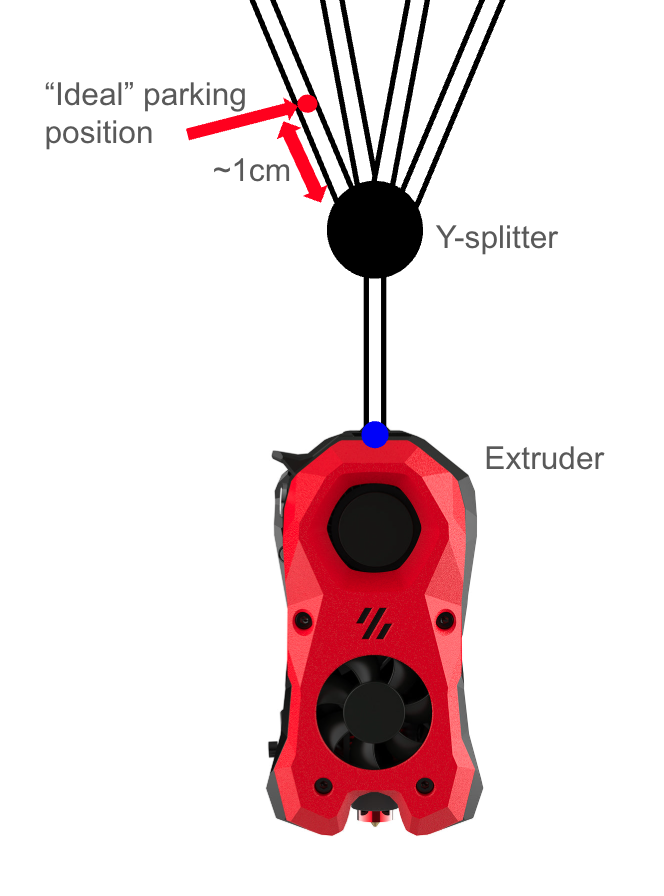
If you have an extruder entry sensor configured, determining your parking distance from here is super easy.
Run the following commands in Mainsail:
Operation not possible. MMU has filament loaded
If Mainsail reports this error after trying to select a gate, run the following command to tell HH that filament is not loaded.
Note the distance displayed.
Read your toolhead_entry_to_extruder value from mmu.cfg
Inverting a Gear Stepper
If you notice any of your gear steppers moving filament in the opposite direction as expected, you need to invert the gear stepper. There are two options to do this:
- Physically flip the stepper cables
- Invert it in software
To invert a gear stepper in software:
Example, if T1 is moving backwards:
Tip
If the pin already has a ! in front of it, remove it to invert it.
Restart Klipper.